Sheet nesting methods
Choose between Easiest to cut, Least waste, Batch cutting and CNC / router layouts.
Available onFree toolsProBusinessTeam
Updated September 27, 2026Browse all help topics
Where to change it
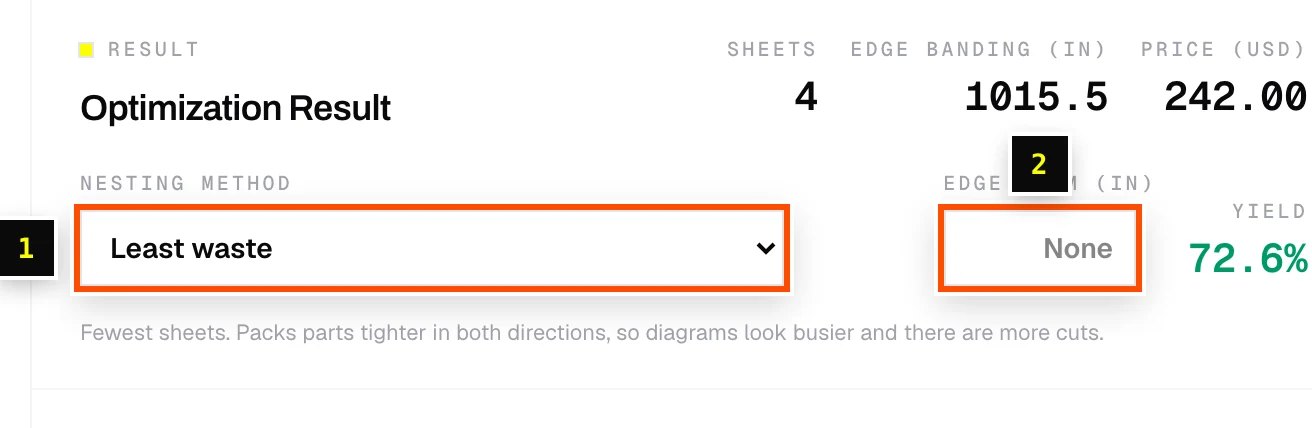
In the Optimization Result panel, open Nesting method and pick one. The layout re-runs straight away, so you can compare sheet counts.
The four methods
| Method | What it does | Best for |
|---|---|---|
| Easiest to cut | Every cut runs straight across the sheet, so it's fast to break down. Usually costs a sheet or two more than least waste. | Table saw, panel saw, track saw. |
| Least waste (default) | Fewest sheets. Packs parts tighter in both directions, so diagrams look busier and there are more cuts. | Expensive sheet goods where material cost matters most. |
| Batch cutting | Groups identical panels into uniform bands so you set a stop once and repeat-cut. The leftover of each sheet is filled in to keep waste down. | Production runs of the same cabinet or shelf. |
| CNC / router | Least-waste nesting plus a clearance ring around every part for clamps and spoilboard. | CNC routers. Pair with DXF export. |
Related articles
Didn't find what you need?
Email us and tell us which article you were reading.