Import from CSV or Excel
Load a parts list from a spreadsheet: which columns are read, sample files, and tips.
Browse all help topics
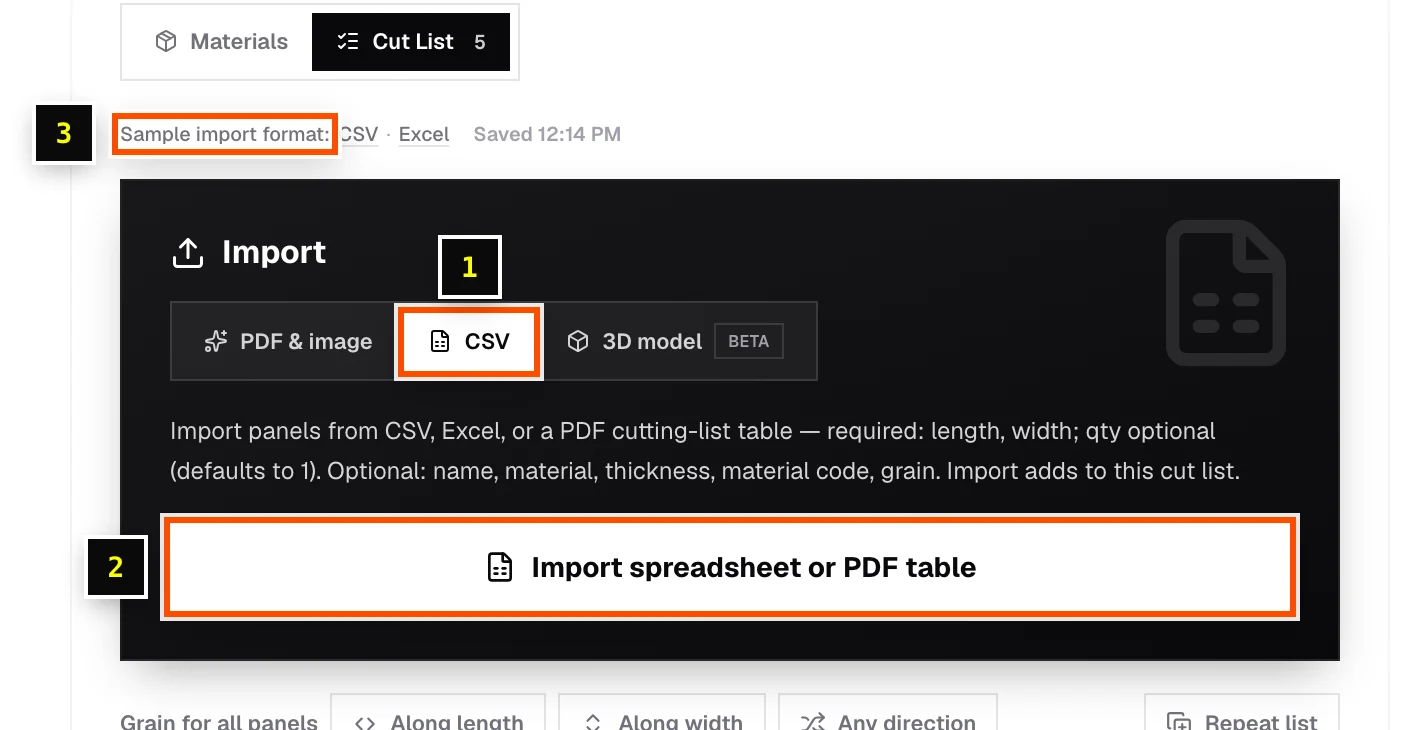
Import a file
- Step 1: In a sheet or linear cut list, find the Import card and choose the CSV tab.
- Step 2: Click Import spreadsheet or PDF table (sheet) or Import spreadsheet (linear) and choose a
.csvor.xlsxfile. - Step 3: The rows are added to the current list. Existing parts are kept.
- Step 4: Check the sizes, then set grain, edge banding and materials where you need them.
Columns for sheet cut lists
| Column | Required? | Also recognized as |
|---|---|---|
| length | Required | len, l, long |
| width | Required | w, wide |
| qty | Optional (defaults to 1) | quantity, count, pcs, pieces |
| name | Optional | part, label, title, description, component |
| material | Optional | material name, board, board type, substrate, stock name |
| thickness | Optional | thick, thk, t |
| material code | Optional | stock code, item code, sku |
| grain direction | Optional | grain, grain dir. Values like horizontal/length or vertical/width |
Column headers aren't case-sensitive, and units in brackets like Length (in) are fine. Any other column becomes a custom field.
Columns for linear cut lists
| Column | Required? |
|---|---|
| length | Required |
| qty | Optional (defaults to 1) |
| name | Optional |
| material code | Optional |
| material name | Optional |
Units in your file
Plain numbers are read in your current Entry unit. With entry unit in, 23.75 means 23 3/4". Cells can also carry a unit or be written in feet and inches, such as 1' 11 3/4", 603mm or 23 3/4". See Units, fractions and measurement formats.
Exports from other software
Cutlistor recognizes common workshop and crating export layouts, including Crate Pro. For example, if a file has both a per-crate Qty and a total QtyTot, the total is used. Rows marked as hardware or fasteners are skipped.
Free tool limit
The free tools import the first 5 rows of a spreadsheet. Paid plans import the whole file.
Related articles
- Import a PDF cutting listRead a parts table straight out of a PDF, such as a cutting list exported by design software.
- Custom fieldsAdd your own columns to a parts list, such as Room, Cabinet # or Finish.
- Import columns aren't recognizedFix CSV and Excel files that import the wrong values or nothing at all.
Didn't find what you need?
Email us and tell us which article you were reading.