Paint estimate
Estimate how much primer, paint or finish your linear parts need.
Available onProBusinessTeamBeta
Updated September 27, 2026Browse all help topics
Turn it on
- Step 1: Turn on the Paint chip (marked Beta) in the toolbar.
- Step 2: Make sure your stock has Width / Ø and Thickness. Paint area is calculated from them.
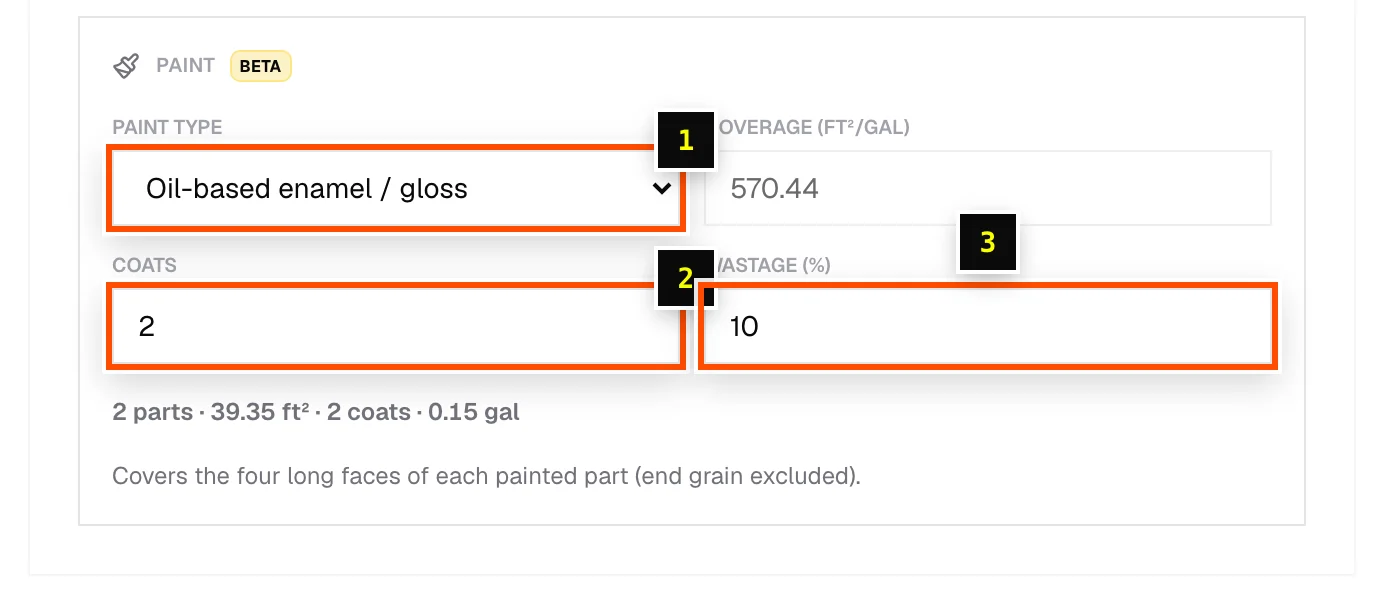
- Step 3: In the Paint panel on the Materials tab, choose a Paint type: Wood primer / undercoat, Water-based emulsion, Oil-based enamel / gloss, Polyurethane / varnish, Wood stain, NC lacquer (spray), 2K PU (spray), or Custom… with your own Coverage.
- Step 4: Set Coats (1–10) and Wastage (%) (up to 50%).
- Step 5: On the Cut List tab, tick Paint this part on each part to paint, or use Paint all / Paint none.
How it's calculated
The estimate covers the four long faces of each painted part (end grain is excluded), multiplied by the number of coats, divided by the coverage, plus the wastage allowance. In imperial units coverage is shown in ft²/gal.
Related articles
Didn't find what you need?
Email us and tell us which article you were reading.